By Credexa Solutions | Updated October 2026 | Category: Provider Credentialing
If you are starting BCBS Colorado provider enrollment, the first thing to know is that you are not dealing with a company called “BCBS Colorado.” In Colorado, the Blue Cross and Blue Shield plan is Anthem. Every application, every credentialing request, and every contract you sign runs through Anthem, using CAQH for your credentialing data and Availity for the application itself.
That sounds simple. In practice, it is where many practices lose weeks. A CAQH profile that was never attested, a group name that does not match the W-9, a clinician filed through the wrong route, or an approval email mistaken for an in-network effective date can each push your first paid Anthem claim back by a month or more.
This guide is written to prevent those delays. You will learn who Anthem is in Colorado, what counts as a complete application, which route fits your provider type, how the three timelines actually work (Anthem’s, Colorado law’s, and the real-world one), what changes in 2026 matter, and what to set up after approval so claims really pay. Treat it as a working checklist you can hand to your credentialing coordinator.
Quick Answer: How BCBS Colorado Provider Enrollment Works
- Who you enroll with: Anthem Blue Cross and Blue Shield (Elevance Health), the Blue plan licensed in Colorado.
- Where you apply: professional practitioners use Digital Provider Enrollment inside Availity; facilities, ancillary, and noncredentialed providers start from “Begin application” on Anthem’s Colorado join page.
- What you need first: a CAQH (now DataSpring) profile in Initial Application Complete or Reattestation status, with Anthem authorized to view it.
- How long Anthem says it takes: about 45 days after a complete CAQH application, with Colorado law setting a 60-day outer limit for physician applications at regulated carriers.
- What is not included in that number: contracting, your effective date, and EDI/ERA/EFT setup.
- Recredentialing: every three years.
Who Is BCBS in Colorado?
BCBS in Colorado is Anthem Blue Cross and Blue Shield. According to Anthem’s Colorado provider manuals, it is the trade name of Rocky Mountain Hospital and Medical Service, Inc., while HMO Colorado, Inc. underwrites the HMO products. The parent company is Elevance Health.
The Blue Cross Blue Shield system is a federation of independent companies. Each one runs its own credentialing, contracting, and fee schedules. That has two practical consequences:
- Credentialing does not transfer between Blue plans. Being in network with a Blue plan in Arizona, Texas, or Minnesota gives you nothing in Colorado. Multi-state groups file separately in each state. If you are comparing how another Anthem state handles the same process, our BCBS Arizona provider enrollment guide shows how a different Blue plan structures its application path.
- Visiting Blue members still route through Colorado. Under the BlueCard program, you file claims for out-of-state Blue patients with Anthem Colorado, your local plan, not with the member’s home plan.
Search terms like “Anthem provider enrollment Colorado,” “Anthem credentialing Colorado,” and “BCBS CO provider enrollment” all point to the same process described below.
Credentialing, Contracting, and Enrollment Are Three Different Steps
Most confusion in Anthem enrollment comes from treating three separate stages as one.
1. Credentialing. Anthem verifies that you are qualified: license, DEA or CDS registration, education and training, work history, malpractice coverage, and any disclosures. Verification is done against primary sources, and some files go to a credentialing committee. The output is a credentialing decision.
2. Contracting. You sign a participation agreement and accept a fee schedule, either as an individual or as part of a group. The output is a countersigned agreement with an effective date.
3. Enrollment and loading. Anthem builds your provider record (NPI, TIN, service locations) in its claims and directory systems. The output is a record that lets claims pay at in-network rates and places you in the directory.
Anthem’s quoted credentialing time covers stage one only. You need all three finished before a claim pays at contracted rates.
Here is how the gap plays out. Your approval email arrives on a Tuesday, and your front desk starts booking Anthem patients that afternoon. But the agreement’s effective date is two weeks away, so every visit before that date can process as out-of-network or deny. The effective date, not the approval email, is the day in-network billing begins. Always get it in writing.
Some ancillary and noncredentialed provider types contract and load without full credentialing, which is why the next step is matching your provider type to the correct Anthem path.
What Anthem Needs Before You Apply
Anthem needs three things in place before your application can move: a CAQH profile in the right status, identifiers that match everywhere, and current Colorado credentials. Most stalled files trace back to one of these three.
Identifiers That Must Match Everywhere
Each clinician needs an individual (Type 1) NPI. A group that bills under its own name also needs a group (Type 2) NPI and a TIN. The legal business name has to match across your W-9, IRS records, NPPES, CAQH, Availity, and the Anthem application, down to punctuation and suffixes like “LLC” or “PLLC.”
A common snag: the W-9 carries the legal entity name while CAQH shows the trade name on the office sign. Anthem cannot reconcile the two, and the file sits until someone on your side corrects one of them. Before you submit, put the W-9, the NPPES record, and the CAQH profile side by side and confirm the legal name, address, NPI, and TIN agree.
The Ten Items of a Complete Application
Anthem’s Colorado credentialing requirements list the elements of a complete application. Missing even one stops the clock. Use this table as a pre-submission audit.
| Item | What Anthem looks for | Common snag |
|---|---|---|
| Signature and date | A signed, dated application | Attestation pages left unsigned |
| CAQH status | Initial Application Complete or Reattestation | Profile saved but never attested |
| License | Current license in each state where you practice | Colorado license still pending |
| Education or training | Training supporting your specialty, or proof you will finish within 60 days of applying | Residency completion letter missing |
| Hospital privileges | Current privilege information | No admitting arrangement listed |
| DEA or CDS | Current certificate in each state of practice | DEA tied to an out-of-state address |
| Explanations | Written explanation for every “yes” answer | Yes answers with no narrative |
| Work history | Five years, by month and year | Unexplained gaps |
| Malpractice insurance | Current professional liability coverage | Expired certificate uploaded |
| Site review | Availability for a visit within 30 days of request, if applicable | Staff not told a visit may happen |
CAQH Is Now DataSpring: What It Means for You
CAQH announced its rebrand to DataSpring in June 2026. DataSpring’s clinician FAQ says logins, portal access, and provider profiles stay the same and providers do not need to take action. Anthem’s Colorado pages may still say CAQH ProView, and Anthem reads the same profile you have always maintained.
What matters operationally has not changed:
- Keep the profile in Initial Application Complete or Reattestation status.
- Re-attest at least every 120 days.
- Authorize Anthem by name so it can view the profile.
- Upload current copies of every license, certificate, and policy.
Credentialing cannot start on an expired profile. Anthem lists the CAQH provider help line as 888-599-1771.
Colorado’s Uniform Credentials Application
Colorado requires health care entities and plans that gather credentialing data to use the Colorado Health Care Professional Credentials Application. Anthem collects your data through CAQH, but hospitals and other Colorado plans may still request the state form. Keep a completed, signed copy on file so you are not rebuilding it under a deadline.
Which Anthem Enrollment Path Fits Your Practice?
Professional practitioners apply through Anthem’s Digital Provider Enrollment tool in Availity. Facilities, ancillary providers, and noncredentialed providers start from “Begin application” on Anthem’s Colorado join page. Chiropractors, acupuncturists, massage therapists, and nutritional counselors skip Anthem’s application and contract through American Specialty Health (ASH).
| Your situation | Where you apply | What to know |
|---|---|---|
| Individual clinician | Digital Provider Enrollment in Availity | Anthem credentials you through CAQH |
| Clinician joining an Anthem-contracted group | Digital Provider Enrollment in Availity | Joins the existing contract; no new group agreement |
| New group requesting a contract | Digital Provider Enrollment in Availity | Have group TIN, Type 2 NPI, and W-9 ready |
| Facility or health delivery organization | “Begin application” on Anthem’s Colorado join page | May need its own credentialing (licensure plus accreditation or recent survey) |
| Ancillary or noncredentialed provider | “Begin application” on Anthem’s Colorado join page | Contracting and loading still apply |
| Behavioral health clinician | “Begin application” on Anthem’s Colorado join page | Expect Carelon Behavioral Health to handle parts of the process |
| Chiropractic, acupuncture, massage, nutrition | American Specialty Health | Anthem returns submissions sent to it |
Nurse practitioners and physician assistants generally follow the individual practitioner route. You may also see references to older Anthem forms; before using any form, confirm on Anthem’s Colorado join page which route currently applies, because Anthem’s processes differ from state to state.
BCBS Colorado Provider Enrollment: The 7-Step Process
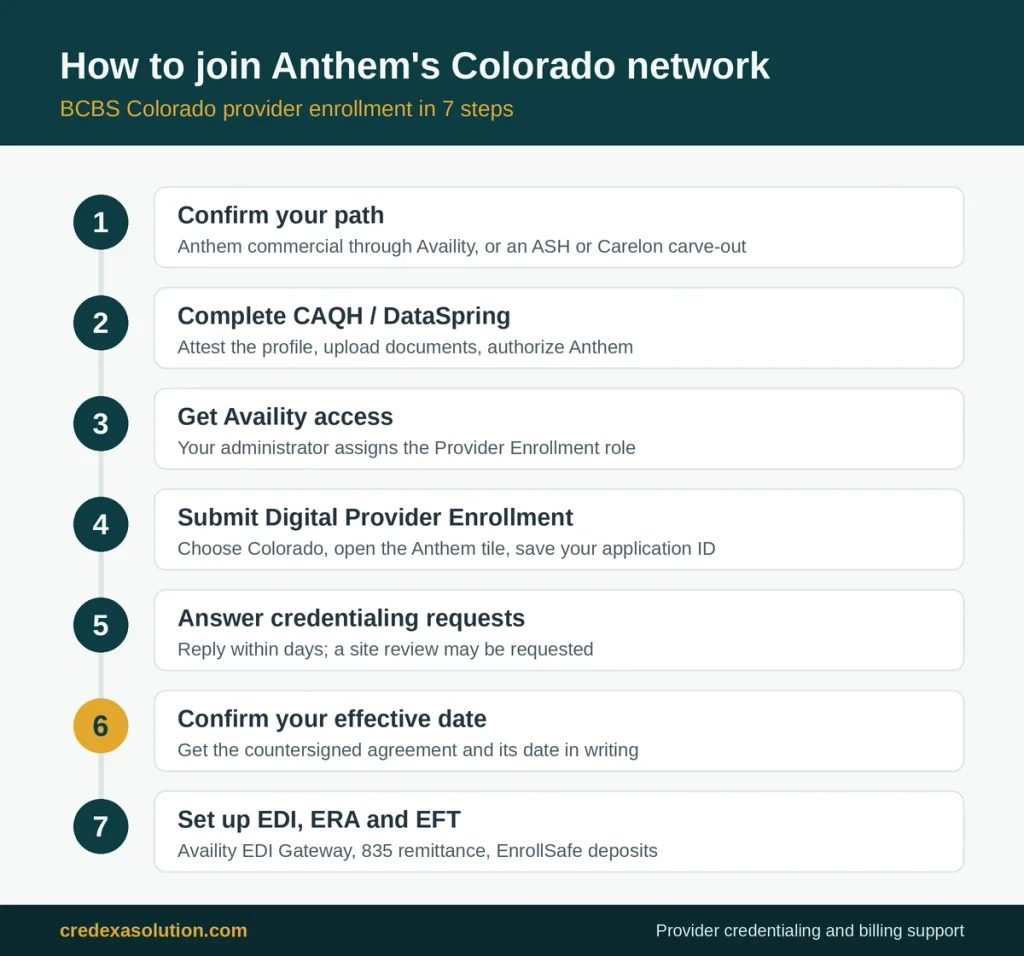
The process breaks into seven steps: confirm your path, complete CAQH, get Availity access, submit the application, answer verification requests, sign the agreement and confirm your effective date, and finish payment setup before your first visit.
Step 1: Confirm Your Plan, Product, and Path
Decide which Anthem products your patients carry (commercial, Medicare Advantage, or Medicaid-related plans) and which application route your provider type uses. Each product follows its own rules. If you are a chiropractor, acupuncturist, massage therapist, or nutritional counselor, stop here and go to ASH.
Step 2: Complete Your CAQH Profile and Authorize Anthem
Upload your Colorado license, DEA or CDS certificate, malpractice certificate, and five years of work history, then attest. Your status must read Initial Application Complete or Reattestation. Grant Anthem access inside the profile. Because Anthem pulls from CAQH, any error you leave there follows you through the entire process.
Step 3: Get Availity Access With the Provider Enrollment Role
Ask your organization’s Availity administrator to register the practice once and create a login for each user. Staff can sign in without the Provider Enrollment role, but they cannot open the enrollment tool until the administrator assigns it. Availity Client Services handles access problems at 800-282-4548, Monday to Friday, 8 a.m. to 7 p.m. ET.
Step 4: Submit the Digital Provider Enrollment Application
In Availity, choose Colorado, open Payer Spaces, select the Anthem tile, then go to Applications and Provider Enrollment. Newer screens may label it Provider Enrollment and Network Management. The tool pulls practice data from CAQH, so a clean profile makes this step faster. Save the application ID the tool returns and track it on the enrollment dashboard.
Step 5: Answer Credentialing Requests Within Days
Anthem verifies your file against primary sources and may request a site review within 30 days. Reply to every request quickly. To correct something you already submitted, email credentialing@anthem.com with your NPI and application ID so there is a written trail.
Step 6: Sign the Agreement and Confirm Your Effective Date
Do not schedule Anthem members as in-network until you hold a countersigned agreement with an effective date. This is the single most expensive assumption in provider enrollment. Visits before that date can process as out-of-network, and the patient may receive the bill.
Step 7: Set Up Claims, ERA, and EFT Before the First Visit
Connect to the Availity EDI Gateway, enroll for 835 electronic remittances, and register EFT through EnrollSafe. Skip any one of the three and payment stalls, even after Anthem lists you as in-network.
How Long Does BCBS Colorado Provider Enrollment Take?
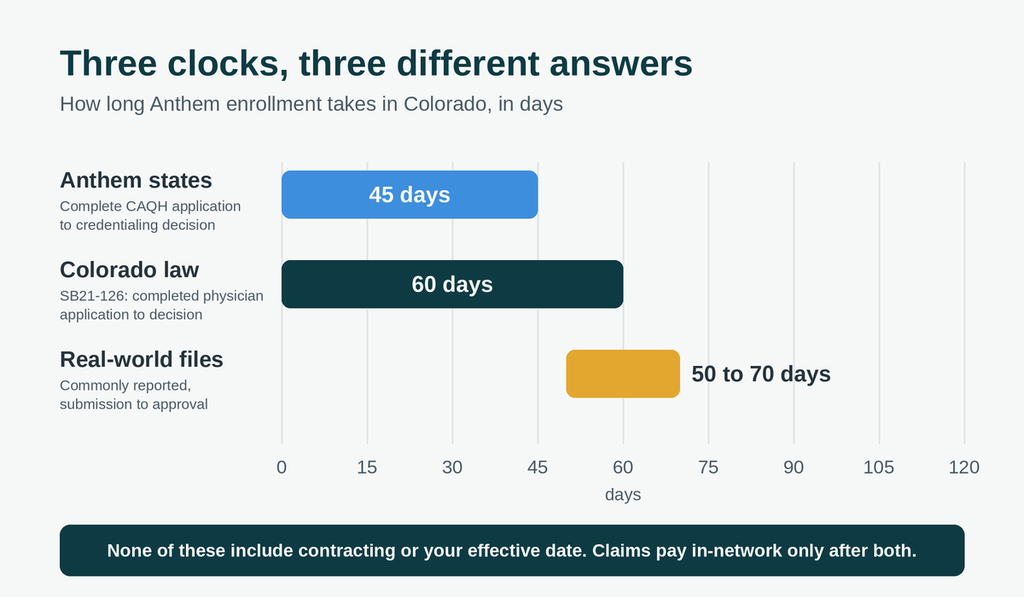
There are three clocks, and they measure different things.
Clock 1: What Anthem States
Anthem says credentialing takes about 45 days after it receives a complete CAQH application. The clock starts only when Anthem holds a complete application. A profile missing an attestation or an Anthem authorization leaves that clock at zero, which is why the timeline on paper can look nothing like the one in your inbox. The 45 days also ends at the credentialing decision; contracting and the effective date come after.
Clock 2: What Colorado Law Requires
Colorado’s credentialing law, SB21-126 (codified at C.R.S. 10-16-705.7, effective September 7, 2021), sets deadlines for carriers regulated by the Colorado Division of Insurance when a physician applies to join a network.
| Deadline | What the carrier must do |
|---|---|
| Day 7 | Send written or electronic receipt of the application |
| Day 10 | Notify the physician of an incomplete application, listing every missing item |
| Day 53 | Treat the physician as participating if a completed application was received and the day-7 receipt was missed |
| Day 60 | Finish credentialing, counted from the completed application |
| 10 days after the decision | Notify the physician of the outcome |
The law’s definition of applicant covers physicians. Nurse practitioners, PAs, and therapists fall outside it, and self-funded employer plans fall under federal ERISA rules, so state insurance law does not reach them. Carriers with qualifying delegated credentialing agreements or credentialing alliances can count as compliant, and the Commissioner of Insurance enforces the rest. You can read the bill text on the Colorado General Assembly site.
Clock 3: What Actually Happens in Real Files
Industry estimates for Anthem enrollment range widely, from roughly 30 to 120 days, depending on whether the writer counts through the credentialing decision or through the effective date. Practices commonly report approvals in the range of 50 to 70 days from submission, so plan around that window rather than the best-case number.
Four things stretch a timeline most often:
- Incomplete or unattested CAQH profiles
- Missing Anthem authorization inside CAQH
- Mismatched legal names, NPIs, or TINs
- Site reviews and contract revisions
Every week a file sits in review is a week of visits you cannot bill in-network. A weekly status check, logged with dates and names, is the cheapest way to keep a file moving.
Behavioral Health and Specialty Carve-Outs
Two groups of Colorado providers do not follow Anthem’s standard route.
Behavioral Health: Anthem or Carelon?
Anthem’s Colorado join page lists behavioral health providers under “Begin application.” Carelon Behavioral Health, Elevance Health’s behavioral health company, publishes its own Colorado provider guidance for Anthem plans, so expect Carelon staff to work on your file even though the application begins with Anthem.
Before you file, check which product your patients carry and ask whether you will need to join the Carelon network for any of them. A carve-out network does not follow automatically from your Anthem medical contract.
If a carrier misses Colorado’s credentialing deadlines or a contract issue stalls, the Colorado Division of Insurance accepts reports from behavioral health providers at dora_bh_provider_issues@state.co.us. Its behavioral health provider resources page explains what the Division can and cannot act on.
Chiropractic, Acupuncture, Massage, and Nutrition
Since August 1, 2017, Anthem has routed chiropractors, acupuncturists, massage therapists, and nutritional counselors in Colorado through American Specialty Health. ASH handles joining, contract copies, fee schedules, and demographic changes, then passes approved changes to Anthem. Anthem returns anything these providers send to it directly. Anthem lists ASH’s provider line as 800-972-4226.
Commercial vs. Medicare Advantage vs. Health First Colorado
BCBS provider enrollment in Colorado covers Anthem’s commercial network. Medicare Advantage and Medicaid run as separate programs with their own rules. An Anthem commercial contract does not enroll you in Medicare or Health First Colorado.
Medicare Advantage
Anthem runs its Colorado Medicare Advantage plans under a separate provider manual (effective April 1, 2026). Ask Anthem whether your commercial credentialing covers its Medicare Advantage network before you bill an MA member as in-network. If you also bill Original Medicare, you enroll through PECOS with your NPI and the appropriate application for your Medicare Administrative Contractor, as described in the CMS provider enrollment resources.
Health First Colorado (Medicaid)
Health First Colorado enrollment is filed with the state through the Provider Web Portal described on the HCPF provider enrollment page. The 2026 application fee for institutional providers is $750, up from $730 in 2025. Ordering, prescribing, and referring providers must enroll even if they never bill. HCPF will not pay an imaging or lab claim unless the ordering provider is enrolled and that NPI appears on the claim. Regional organizations may run their own credentialing after state enrollment, so budget time for that second stage.
After Approval: Getting Anthem Claims Paid
BCBS Colorado provider enrollment does not end at approval. Before your first claim, three technical connections must be live.
EDI Through Availity
Anthem requires trading partners to send Anthem transactions through the Availity EDI Gateway. That covers 837 claims, 835 remittances, 270/271 eligibility, 276/277 claim status, 278 authorizations, and 275 attachments. If you bill through a clearinghouse, confirm it routes Anthem traffic through Availity before your first claim date. A misrouted claim sits in a rejection queue nobody checks until the patient balance ages. Review Anthem’s Colorado EDI page for current requirements.
ERA and EFT
Register or change your Anthem 835 ERA profile in Availity (My Providers, then Enrollment Center, then Transaction Enrollment). If a clearinghouse handles remits, set up ERA through that vendor instead. For EFT, Anthem sends Colorado providers to EnrollSafe to register and manage bank account changes. Each EFT deposit carries a trace number that matches its 835, and that match is how your posting team ties cash to claims. Without the ERA, you see a deposit with no claim detail behind it.
Eligibility Checks Before Every Visit
Verify eligibility in Availity before the visit. For BlueCard patients, the first three characters of the member ID (the prefix) identify the home plan. Catching inactive coverage at the front desk is far cheaper than discovering it after a denial.
Know Your Timely Filing Window on Day One
Your Anthem agreement sets the filing deadline, so read it the day you sign rather than after a rejection teaches you the limit. Our Anthem timely filing limit 2026 guide explains the deadlines and how to handle CO-29 denials when a claim goes out late.
Staying in Network: Recredentialing and Profile Upkeep
Anthem recredentials network providers every three years. If your CAQH profile is current, recredentialing may need little from you. If the profile is expired or incomplete past the due date, Anthem can treat the file as incomplete and end your participation through administrative termination.
| Task | How often | Where |
|---|---|---|
| Recredentialing | Every three years | Anthem, through your CAQH profile |
| CAQH re-attestation | At least every 120 days | CAQH / DataSpring provider portal |
| Directory verification | At least every 90 days (No Surprises Act) | Availity Provider Data Management |
| Address, location, roster changes | As they happen | Availity Provider Data Management |
For physicians, SB21-126 bars carriers from requiring a new application or new contracting process just to recredential. A credentialed physician stays in network unless the carrier finds the physician no longer meets its participation guidelines.
Put the recredentialing date and every license, DEA, and malpractice expiration on one shared calendar. Re-attest CAQH whenever any of them changes. And when Anthem sends a notice about an incomplete profile, answer it the same week; the due date printed on it is the date that triggers termination.
2026 Changes Colorado Providers Should Know
Several 2026 developments touch enrollment and the work right after it.
| Date | Change | What to do |
|---|---|---|
| January 1, 2026 | New Anthem Colorado commercial provider manual | Your contract controls where the two conflict |
| April 1, 2026 | New Anthem Colorado Medicare Advantage manual | Review MA rules that differ from commercial |
| June 2026 | CAQH announces DataSpring rebrand | Keep re-attesting; Anthem reads the same profile |
| About July 1, 2026 | Anthem Colorado gold card program takes effect | Check Availity for your exemption status |
| 2026 | Health First Colorado institutional fee rises to $750 | Budget for it at enrollment and revalidation |
| January 1, 2027 | Colorado deadline for electronic prior authorization interfaces; Anthem previews its 2027 commercial manual | Read the preview manual before your contract renews |
Gold Carding and Why Enrollment Timing Matters
Colorado law (HB24-1149) required carriers to build prior authorization exemption programs. Anthem’s Colorado gold card program evaluates a look-back period of prior authorization requests and generally requires a minimum volume of requests for a specific CPT code with a high approval rate, plus Colorado licensure, credentialing, a contract, and good standing. Eligibility is decided per individual NPI and applies to plans Anthem insures and issues in Colorado; self-funded employer plans do not qualify. Review the exact criteria on Anthem’s prior authorization exemptions page, since thresholds can change.
The takeaway for new enrollees: gold carding requires credentialing and a contract, so a late enrollment also delays your shot at fewer authorizations.
Who to Contact and How to Check Your Status
Anthem’s Colorado join page does not list a dedicated credentialing phone number; it publishes an email instead. Searches for an “Anthem credentialing phone number” mostly surface general lines. Use this table as your contact sheet.
| Need | Where to go | Notes |
|---|---|---|
| Credentialing questions or corrections | credentialing@anthem.com | Include NPI and application ID |
| Application status | Availity enrollment dashboard | Use your application ID |
| CAQH / DataSpring profile help | 888-599-1771 | Listed on Anthem’s Colorado join page |
| Availity access or registration | 800-282-4548 | Mon-Fri, 8 a.m.-7 p.m. ET |
| Chiropractic, acupuncture, massage, nutrition | American Specialty Health, 800-972-4226 | Contracts and demographic changes |
| Patient claims and benefits | Provider Services number on the member ID card | Verify eligibility in Availity first |
| Missed Colorado credentialing deadline | Colorado Division of Insurance | Behavioral health: dora_bh_provider_issues@state.co.us |
Check your application on the dashboard every week and log each contact with the date and the name of the person you reached. If Anthem passes a Colorado deadline, email credentialing@anthem.com with the application ID and the relevant dates. That written record keeps the file moving and supports any complaint you later file with the Division.
Seven Mistakes That Stall Anthem Applications
Most avoidable delays come from preparation on the practice’s side. Fix these before you submit.
- Unattested or unauthorized CAQH. Anthem cannot start until your status reads Initial Application Complete or Reattestation and Anthem has access.
- Mismatched names and numbers. The W-9, NPPES, CAQH, and application need identical legal names, NPIs, and TINs.
- Missing Provider Enrollment role in Availity. Your biller can sign in, but the enrollment tool stays locked until the administrator assigns the role.
- Carve-out files sent to Anthem. Chiropractic, acupuncture, massage, and nutrition applications belong with ASH.
- Scheduling before the effective date. Early visits can process as out-of-network.
- Skipped ERA and EFT setup. Payments arrive late or on paper, and posting cannot match deposits to claims.
- Lapsed recredentialing. An expired profile at renewal can end in administrative termination.
When a file stalls, start with mistakes one and two. Pull the CAQH profile, the W-9, and the NPPES record side by side. In most stalled files, one of those three disagrees with the others.
Do-It-Yourself vs. Outsourced Enrollment
Anthem’s Colorado join page does not list an application fee, so the real cost of enrollment is staff time plus every visit you cannot bill in-network while the file waits. The right choice depends on your size and bandwidth.
- In-house works when you are enrolling one or two providers with one payer and have a staff member who already knows CAQH and Availity.
- Outsourcing pays off when you are opening a new practice, onboarding several providers, enrolling with multiple payers at once, or cannot spare someone to watch queues and chase status weekly.
Before you hire any credentialing company, ask five questions:
- Is pricing per payer or per provider?
- Does it include CAQH upkeep, payer follow-up, and recredentialing?
- How quickly do they file once your documents are complete?
- Do they stop at approval, or also set up ERA, EFT, and billing?
- What happens to the fee if a payer denies the application?
How Credexa Solutions Helps With Provider Enrollment and Medical Billing
Enrollment is only the front door. The practices that get paid fastest treat credentialing, clean coding, claim submission, and denial follow-up as one connected process.
Credexa Solutions supports healthcare practices across that whole chain:
- Provider credentialing and contracting: CAQH management, payer applications, status follow-up, and recredentialing tracking so nothing lapses.
- Medical billing services: accurate coding and clean claim submission from the first Anthem visit.
- Denial management with accurate coding: root-cause fixes instead of resubmitting the same error. See our denial management process guide for how we approach it.
- AR follow-up and eligibility verification: catching coverage problems before the visit and chasing unpaid claims after it.
Because one team handles enrollment through payment, the person who files your Anthem application also understands what must be true for your first claim to pay.

BCBS Colorado Provider Enrollment FAQs
Is Anthem the same as BCBS in Colorado?
Yes. Anthem Blue Cross and Blue Shield is the Blue plan in Colorado. When a Colorado practice says it wants BCBS enrollment, it means enrolling with Anthem through CAQH and Availity.
How long does Anthem credentialing take in Colorado?
Anthem states about 45 days after it receives a complete CAQH application. Colorado law gives regulated carriers 60 days to decide on a physician’s completed application, and many practices see approvals in the 50 to 70 day range from submission. Contracting and the effective date add time after the credentialing decision.
Can I see Anthem patients while my application is pending?
You can see them, but claims for visits before the agreement’s effective date may process as out-of-network or deny. Either tell patients up front or book Anthem members from the effective date forward.
Does BCBS credentialing from another state transfer to Colorado?
No. Each Blue plan credentials independently, so approval in another state, even another Anthem state, does not carry over.
What is the Anthem credentialing phone number for Colorado?
Anthem’s Colorado join page lists an email, credentialing@anthem.com, rather than a credentialing phone number. Call 888-599-1771 for CAQH profile help and Availity Client Services at 800-282-4548 for portal access. Patient-specific claims questions go to the Provider Services number on the member’s ID card.
How do I check my Anthem enrollment status?
Log in to Availity and open the Provider Enrollment dashboard with the application ID you received at submission. If the status has not moved in two weeks, email credentialing@anthem.com with your NPI and application ID.
Do chiropractors enroll with Anthem in Colorado?
No. Chiropractors, acupuncturists, massage therapists, and nutritional counselors contract through American Specialty Health, which sends approved changes to Anthem.
Does Anthem still use CAQH after the DataSpring rebrand?
Yes. DataSpring says logins, portal access, and provider profiles stayed the same. Keep your profile in Initial Application Complete or Reattestation status, re-attest at least every 120 days, and keep Anthem authorized.
How much does it cost to get credentialed with Anthem in Colorado?
Anthem’s Colorado join page does not list an application fee. Your cost is staff time plus delayed in-network billing. If you outsource, fees vary by company, so confirm whether pricing is per payer or per provider and what follow-up it includes.
Final Thoughts: Join Anthem’s Colorado Network Without the Guesswork
Three moves decide how fast your enrollment goes. Pick the right path for your provider type. Get CAQH complete and authorized before you ever open Availity. And treat the effective date, not the approval email, as the start of in-network billing.
Then finish the job: connect EDI, ERA, and EFT, know your timely filing window, and calendar your recredentialing. Done in that order, BCBS Colorado provider enrollment stops being a mystery queue and becomes a checklist you control.
If you would rather not manage CAQH attestations, Availity queues, and weekly payer follow-up yourself, Credexa Solutions can handle enrollment and the billing that follows. Book a free audit and we will tell you what is missing from your file, even if you decide to file it yourself. You can also explore our full range of RCM services or browse more guides on the Credexa blog.
Disclaimer: Payer rules, portals, and fees change often. Always confirm current requirements directly with Anthem, CAQH/DataSpring, and the Colorado Division of Insurance before you submit.